JIRA and Crucible

Recently I've started using some new tools from Atlassian and they have some really cool features compared to others I've used so far.

JIRA is Atlassian's issue tracking system and these are some of the things I like about it:
1. A cool web-based UI


2. Plug-ins for IntelliJ IDEA that makes it so much easier to use


3. Workflow customizable to any project


4. A customizable dashboard with project reports and statistics


5. Multi-dimensional reporting - reports can be read in a variety of dimensions, including pie chart, linear or column graphs, and statistical tables
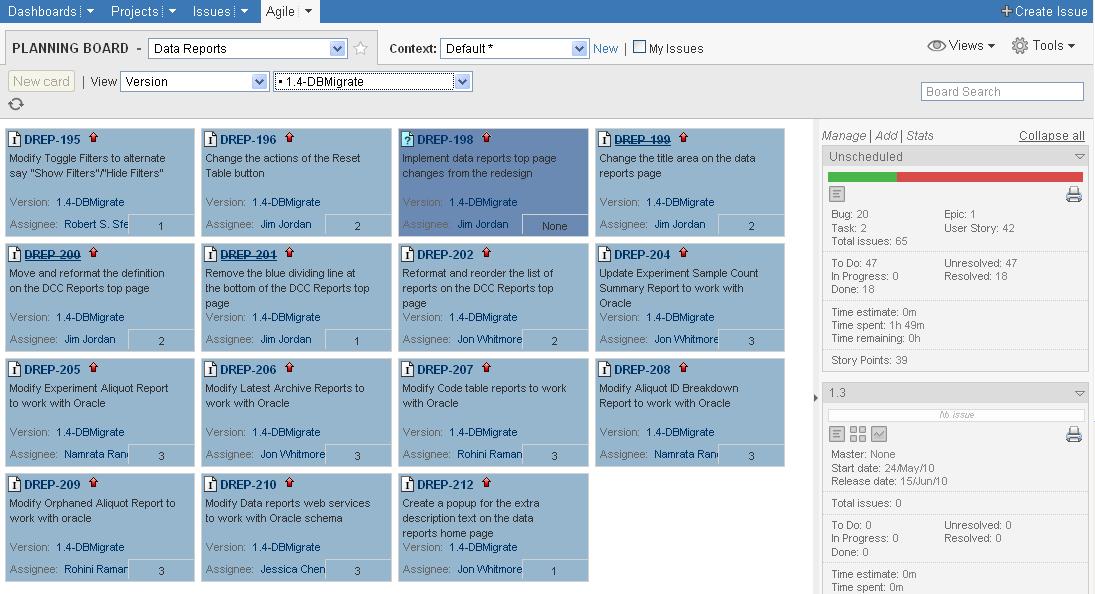


It was first launched in 2003 and so is relatively new compared to Bugzilla and other similar tools

Crucible is Atlassian's code review tool. It is a lightweight, web-based tool that makes code review a breeze.
For someone used to various code review tools, this seems to be the best and all developers will love it.

These are some of the cool things about Crucible:
1. The team doesn't have to meet together in one place. Code revies can be completed asynchronusly
2. Sub-tasks or issues can be created out of code review comments
3. JIRA integration
4. Inline comments makes it so much more easier to track the review and provide feedback
5. The diff tool is very useful and pleasant to use

The many uses of DBMS_RANDOM

DBA's are often faced with scenarios where they have to generate test data for developers. Let's say you have a test database with no values in a certain field. Using DBMS_RANDOM, you can just generate them on your own.
Example: Refer the table structure in my previous post. Let's say I don't have any values for Medication. My code values for Medication are 4 digits and range from 0001 to 0100.
These are some ways I would add data for these columns: Let's say I now need to set a few of them to '-1', which is the code for missing data. Here is a great way to do it:
Pick any random value from some other field and use it to assign values to this one. What if you had to generate all the data by yourself? It's not a big deal. Here are some tips:
Generate Time with AM/PM: Random date: One digit value with range: A random string with specific length: Generate a random end date when start date is provided: Date of birth to Age calculation:

Reverse crosstab query in Oracle

Most of us are familiar with cross-tabbing in queries. It's basically changing rows into columns. If you have a requirement to do the reverse, do the following: Let’s say this is the initial table structure: Let's say you need to change this into the following structure: (Columns into Rows) Here is the sql for reverse cross tabbing: This would be the result:
CID DATE_REPORTED MED_CODE MEDICATION REPORTING_PROVIDER SOURCE MEDICATION_TYPE
77518254 14.10.2009 0032 ARTANE(TRIHEXYPHENIDYL)(ANTI-CHOLINERGICS) 20 MICP MEDICATION 1
77518254 14.10.2009 0008 LUVOX(FLUVOXAMINE)(ANTI-DEPRESSANTS) 20 MICP MEDICATION 3
77518254 14.10.2009 0101 MARPLAN(ISOCARBOXAZID)(ANTI-DEPRESSANTS) 20 MICP MEDICATION 3
77518254 14.10.2009 0112 MARPLAN(ISOCARBOXAZID)(ANTI-DEPRESSANTS) 20 MICP MEDICATION 4

Enforcing database security policies

Here is a script that displays the attributes you’ll use most often for enforcing database security policies: This view provides useful information that can be used in implementing your security policies. For example, the user’s IP address and authentication mode are available and can be used to govern what a user has access to. The Client Identifier can be set by an application and used to track and trace connected sessions. Reference: Effective Oracle Database 10g Security by Design by David Knox

Surrogate Keys

Surrogate keys are those that serve as the join fields between the fact and dimension tables in a dimension data warehouse. Surrogate keys are widely used in data warehouses instead of merely referencing the operational natural keys due to its advantages:

  1. Performance – using a 4-byte integer usually makes a great surrogate key because it can represent 232 values. This is compact and efficient compared to bulky alphanumeric natural keys used by the operational systems. This translates into better performance by using more efficient joins, smaller indices, and more fact rows per block.
  2. Space saving - As surrogate keys are only 4 bytes long, they occupy less space that the bulky alphanumeric production keys. For example the date data type occupies 8 bytes. So by using surrogate keys we save 4 bytes. If we have 1 billion records in the fact table, we would be saving 4x1billion bytes = 3.73 GB of space!!!!
  3. Buffer from operational key management practices – reuse of operational keys pose a problem using them in a data warehouse that stores historical data. Using a surrogate key creates a buffer from potential problems like these.
  4. Mapping to integrate disparate sources – Systems developed independently in company divisions may not use the same keys, or they may use keys that conflict with data in the systems of other divisions. This situation may not cause problems when each division independently reports summary data, but it cannot be permitted in the data warehouse where data is consolidated. Since data warehouses are populated from many different operational data sources, using surrogate key acts as an integration mechanism and the ETL process uses a mapping table to uniquely identify the linked natural keys.
  5. Handle unknown or not applicable conditions – there are cases when the data in the operational data source may violate certain rules followed by the data warehouse. For example, the operational key could have null values which may pose a problem since these are the foreign keys to the fact table which cannot have null values. Using a surrogate key prevents conditions like these.
  6. Track changes in dimension attribute values – Though dimension attribute values are more static than fact tables, they may still undergo changes. Using a surrogate key, we can generate new keys for each change and easily handle the versioning. This enables easier changes to attributes when business requirements/rules change
  7. Easier implementation - Surrogate keys enable easier implementations of concurrency than natural keys. In the natural key case, if two users are concurrently working with the same information set, such as a customer row, and one of the users modifies the natural key value, then an update by the second user will fail because the customer code they are updating no longer exists in the database. In the surrogate key case, the update will process successfully because immutable ID values are used to identify the rows in the database, not mutable customer codes.

A surrogate key may be meaningful or meaningless. A meaningful key stores information within the key. Meaningless keys are sometimes called system keys because they only have meaning to the system. The advantages of meaningful keys are that they are constructed for data clustering, reducing retrieval times. The disadvantages of meaningful keys are that they are inflexible and rely on a code structure that could break.

A surrogate key can be created by using CREATE SEQUENCE command.

The Unix WGET command

WGET is a great Unix tool to retrieve files from the World Wide Web using HTTP and FTP.

This is especially useful for downloading directories and files from the web.

Example:

wget -r http://asap.ahabs.wisc.edu/~glasner/EnteroFams/alignments

Using this, GNU has come up with "GNU Wget", a free software package for retrieving files using HTTP, HTTPS and FTP.


Use the wget command to download files to a remote Unix/Linux workstation

wget is especially useful for bioinformaticians working with NCBI. NCBI has a ftp site with major resources for researchers. If you are working on a Unix/Linux machine remotely through an SSH session, and then you need to get a resource (like a tar or gzip file) that's on the NCBI ftp site, there are the following options.

  1. You can download that file to your local machine.
  2. Use scp to copy it to your remote Unix box.

You can bypass this two step process using the wget command:

Copy the URL for the resource in your local workstation and use wget on the remote workstation and download it directly to that machine.

In my SSH terminal I typed this:
wget ftp://ftp.ncbi.nih.gov/gene/DATA/gene2refseq.gz

As soon as the download was completed I had the files I needed on my remote server, with no need for the extra scp step.

You can also try the different options available for wget

Example:

wget -r -l1 --no-parent -A.html http://asap.ahabs.wisc.edu/~glasner/EnteroFams/alignments/
Here, -r -l1 means to retrieve recursively, with maximum depth of 1. --no-parent means that references to the parent directory are ignored. And -A.html means to download only the HTML files. -A "*.html" would have worked too.

One more thing to know is that this will leave a record in the remote system's access log files, showing the hit coming from the remote system where you ran the wget command.

ClassLoaders

What is the difference between the different ClassLoaders in Java and when to use what?

A class loader is an object that is responsible for loading classes or resources. In general, when loading a resource dynamically, you can choose from at least three classloaders:

The system classloader:

This is also referred to as the application classholder and handles –classpath.

ClassLoader c1 = ClassLoader.getSystemClassLoader();

The current classloader:

The current classloader loads and defines the class to which your current method belongs. Class.getClassLoader() returns the ClassLoader that loaded the class it is invoked on.

ClassLoader c2 = getClass().getClassLoader();

The current thread context classloader:

ClassLoader c3 = Thread.currentThread().getContextClassLoader();

Thread.getContextClassLoader() returns the ClassLoader set as the context ClassLoader for the Thread it is invoked on. This can be different from the ClassLoader that loaded the Thread class itself if the Thread's setContextClassLoader(ClassLoader) method has been invoked. This can be used to allow the object starting a thread to specify a

ClassLoader, the objects running in that thread should use. The cooperation of some of those objects is required for it to work.

Example:

Properties files are an example of a resource that is loaded using ClassLoaders. Both current classloader and current thread classloader can be used in loading a properties file for a J2EE application.

Using current classloader:

Using current thread context classloader:

References:

http://en.wikipedia.org/wiki/Classloader

R, Vladimir (2003). "Find a way out of the ClassLoader maze. System, current, context? Which ClassLoader should you use?"

javaworld.com. http://www.javaworld.com/javaworld/javaqa/2003-06/01-qa-0606-load.html. Retrieved on 2009-03-11.